
Medidate has two plan types: a punch card, with a fixed number of entries and an expiry, and a membership, renewing or fixed-term, with a weekly or monthly entry limit. You create them on the "Plans" page and students buy them in the app or through a payment link.
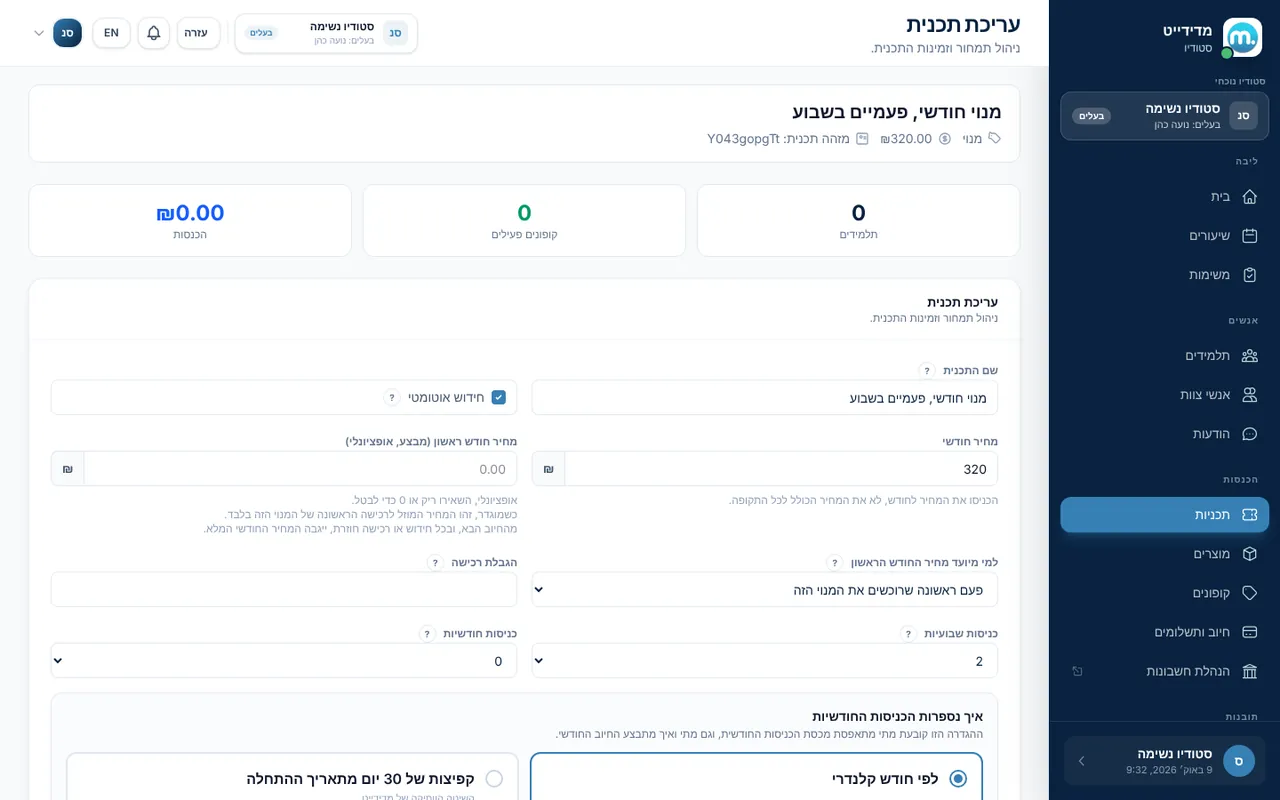
Step by step
- New planOn the "Plans" page click "Add plan" and choose punch card or membership.
- Punch cardSet a name, price, number of entries and an expiration period in weeks or months. You can allow installments (up to 12) and limit the number of purchases.
- MembershipSet a monthly price and a weekly or monthly entry limit. Turn on "Auto renew" for a membership that renews on the student's card every month.
- How monthly entries are counted"Calendar month": entries reset on the 1st and billing happens at the start of the month. Someone who joins mid-month pays and gets entries pro rata, and someone who joins in the last 3 days of the month gets the rest of the month free. "30-day jumps from the start date": billing on the purchase date, with no proration.
- First-month intro priceA renewing calendar-month membership can have a lower "First-month price", for a first purchase of that membership or for new students only.
- Coupons and productsOn "Coupons" create a percentage discount code for punch cards, memberships, products or classes, with dates and usage limits. On "Products" add items for sale with a price and inventory.
Key settings and options
- Plan name, price and color
- Entries and expiration period
- Weekly or monthly entries
- Auto renew
- Installments: up to 3, 6, 9 or 12
- Purchase limit
- Hide from students inside the app
Tips
- lightbulbA new plan is attached to all your existing classes automatically. Narrow it down under "Plan sessions".
- lightbulbOnce a student buys a plan, some fields lock (for example the number of entries on a punch card), so the purchase stays fair.
- lightbulbAn auto-renewing membership needs payments connected, otherwise students won't be charged.
Screen names in these guides use the "Studio" business type. For other business types the system adapts its wording, for example "patient" and "treatment" for a clinic, or "trainee" and "training" for a sports club.
Updated for the current version of the system: October 2026