
Medidate's settings decide how your studio works: business details, booking and cancellation rules, health declaration and terms, privacy, staff and booking links. Open it from "Settings" in the sidebar, which opens the "Profile" page.
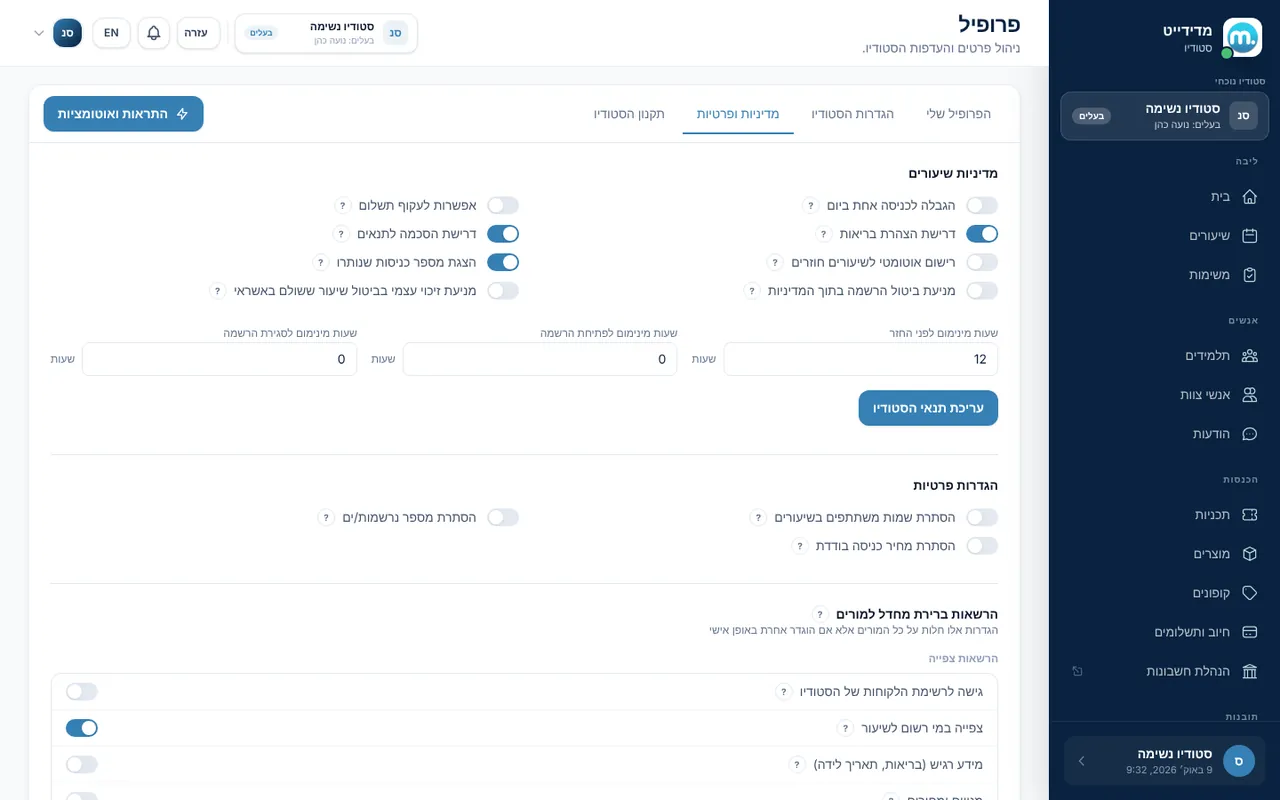
Step by step
- My ProfileOn the "My Profile" tab update your name, email and phone, reset your password, and see your Medidate subscription and invoices.
- Studio SettingsOn the "Studio Settings" tab update name, business type, address and description, and under "Preferences" choose language, time format (24h or AM/PM) and VAT-exempt status. This is also where you turn on "Team management" and find the external links and the schedule widget.
- Policies and privacyOn the "Policies & Privacy" tab set the minimum hours before a refund, when booking opens and closes, and rules such as one entry per day, required health declaration and terms agreement, and auto-sign for recurring sessions.
- Studio termsOn the "Studio terms" tab write your terms or import them from a file (TXT, HTML, DOCX or XLSX). See who signed and who didn't, and send reminders to those who haven't.
- Connect paymentsPayments are set up on the "Billing" page under "Payment providers". Choose Grow (Meshulam), with automatic receipts and invoices, or PayMe, which connects through iCount. This is also where you allow Bit payments in the app.
Key settings and options
- Limit to one entry per day
- Require health declaration
- Require terms agreement
- Auto-sign recurring sessions
- Show remaining entries
- Disable session cancellation within policy
- Don't let students refund a card-paid class themselves
- Hide attendee names, attendee count and drop-in price
Tips
- lightbulbWhen self-refund is off, a student who wants to cancel sends a "cancellation request" and you decide whether to approve it.
- lightbulbHiding attendee names protects privacy in small or therapeutic classes.
Screen names in these guides use the "Studio" business type. For other business types the system adapts its wording, for example "patient" and "treatment" for a clinic, or "trainee" and "training" for a sports club.
Updated for the current version of the system: October 2026